Generate Scenarios by AVUnit
A key distinction of AVUnit in comparison to other languages for scenes is that it provides a user-friendly and domain-specific way to specifys cenarios, in which objects are executing independent journey plans in an environment that is dynamically changing. Without specifying scenarios, many real-world behaviours of AVs may not be properly tested. Asking users to fully specify scenarios, however, would be overwhelming, so AVUnit strikes a balance by allowing them to specify some key parts (e.g. journey waypoints) while leaving the rest to automatic test generation. In particular, AVUnit supports an agent-oriented style of programming, in which the motions of individual objects arespecified in a fully decoupled way. We will present the key features of the language that support this design in this section.
Describe a Scenario
In our desgin, a scenario is composed of six elements: map,ego vehicl ,npc vehicles [Optional],pedestrians [Optional],obstacles [Optional],environment [Optional]. We are going to explore it in this part.
Map
map: Just specify the name of the loaded map.
BNF Defination:
map ::= load(mapName)
Note
The map here is type of String. The BNF defination here is a simplified one. For the complete version, please refer to here.
Related Examples:
map_name = "san_francisco";
map = load(map_name);
Ego Vehicle
Ego Vehicle: The ego vehicle (egoVehicle) is the autonomous vehicle targeted for testing. In AVUnit scenarios it is specified using the keyword AV, followed by some optional parameters:
The initial state of the ego vehicle;
The target state;
The type of the vehicle.
Note
Note that if the ego vehicle is generated without these optional parameters, then two randomly generated states will be assigned, and a default vehicle type will be assigned (e.g. “Lincoln2017MKZ (Apollo 5.0)” for Apollo running with LGSVL). Note that the language does not require the user to specify anything about the ego vehicle’s motion: this is because it is fully controlled by the ADS under test.
BNF Defination:
egoVehicle::= 'AV(' [state ',' state[ ',' type]] ')'
Note
The state here is type of State. The type here is type of Object Type. The BNF defination here is a simplified one. For the complete version, please refer to here.
Related Examples:
ego_init_state = (ENU (553090.05, 4182687.8));
ego_target_state = ("lane_40"->50);
vehicle_type = ("Lincoln MKZ 2017");
ego_vehicle = AV(ego_init_state, ego_target_state,vehicle_type);
Note
The example specifies that the ego vehicle needs to move from the start position (553090.05,4182687.8) in the ENU coordinate system to the lane position which is 50 meters away from the start of Lane “lane40”; its model is Lincoln MKZ 2017.
Npc Vehicles
Npc Vehicles: Scenes can be populated with NPC vehicles (npcVehicle). Similar to the egoVehicle, AVUnit allows the user to (optionally) specify initial and target states, but as they are not controlled by the ADS under test, the user can also specify their motion. We can use npcVehicleList to represent NPC vehicles.
BNF Defination:
npcVehicle ::= 'Vehicle('[state[','[motion] [','[state] [','type]]]]')'
multipleNpcVehicles = npcVehicle | multipleNpcVehicles, npcVehicle
npcVehicleList ::= '{'[<multipleNpcVehicles>]'}'
Note
The motion here is type of Motion. The state here is type of State. The type here is type of Object Type. The BNF defination here is a simplified one. For the complete version, please refer to here.
Related Examples:
heading1 = 10 deg related to ego_vehicle;
npc_init_state = ("lane_39"->20, , 6.0);
npc1_type = "Sedan";
npc_state1 = (("lane_759"->1, ,6), ("lane_759"->20, ,3),("lane_77"->1, ,6), ("lane_77"->30, ,5));
npc1_destination = ("lane_77"->150);
npc1 = Vehicle(npc_init_state, Waypoint(npc_state1), npc1_destination, (npc1_type));
npc_init_state3 = ("lane_779"->0.0, , 1.0);
npc2 = Vehicle(npc_init_state3);
npc = {npc1, npc2};
Pedestrians
Pedestrians: Similar to the egoVehicle, AVUnit allows the user to (optionally) specify initial and target states of Pedestrians, but as they are not controlled by the ADS under test, the user can also specify their motion. We can use pedestrianList to represent NPC vehicles.
BNF Defination:
pedestrianList ::= '{'[multiplePedestrians]'}'
multiplePedestrians ::= pedestrian | multiplePedestrians, pedestrian
pedestrian ::= 'Pedestrian('[state[','[motion] [','[state] [','pedType]]]]')'
Note
The motion here is type of Motion. The state here is type of State. The pedType here is type of Object Type. The BNF defination here is a simplified one. For the complete version, please refer to here.
Related Examples:
ped_position = (553020.54, 4182693.69);
ped_heading = 90 deg related to "lane_38"->30;
ped_init_state= (ped_position, ped_heading, 1.0);
ped_state_list = (((553020.54,4182693.69), ped_heading, 1.0),((553023.26, 4182671.82), ped_heading, 1.0));
ped_motion = Waypoint(ped_state_list);
ped_type = "Howard";
ped0 = Pedestrian(ped_init_state, ped_motion, , ped_type);
ped = {ped0}
Obstacles
Obstacles: In an AVUnit scenario, a static obstacle is defined by its position and static type (e.g. sphere,box, cylinder).
BNF Defination:
obstacle ::= 'Obstacle('[position[','staticType]]')'
obstacles ::= '{'[multipleObstacles]'}'
multipleObstacles ::= obstacle | multipleObstacles, obstacle
Note
The position here is type of Position. The staticType here is type of Object Type. The BNF defination here is a simplified one. For the complete version, please refer to here.
Related Examples:
obs_position = (553020.54, 4182693.69);
obs_type = (sphere, 2)
obs = Obstacle(obs_position, obs_type)
Environment
Environment: AVUnit allows for dynamically changing environments to be specified in scenarios. This is achieved simply by specifying the weather to be simulated at different times. We can specify the environment explicitly (env), or leave the parameters empty in order to use the default environment settings.
BNF Defination:
env ::= 'Environment('[time','weather]')'
Note
The time here is type of Time. The weather here is type of Weather. The BNF defination here is a simplified one. For the complete version, please refer to here.
Related Examples:
time = 12:00;
weather = {rain:0.5, fog: 0.1, wetness: heavy};
evn = Environment(time, weather);
Scenario Definition
Scenario: Finally, we can create a scenario featuring combinations of all of the above agents in AVUnit using the CreateScenario keyword. The user specifies the map to load, the ego vehicle, lists of Npc Vehicles and pedestrians (associated with their independent uniform/waypoint motion configurations), a list of static objects,and (optionally) the environment. Note that our simplified grammar omits the rules for lists of vehicles, pedestrians, and obstacles: they are simply comma-delimited lists defined in the standard way.
BNF Defination:
scenario ::= 'CreateScenario({  'map';
                                'egoVehicle';
                                'npcVehicleList';
                                'pedestrianList';
                                'obstacleList';
                                '[env';']
'}'
Note
The map here is type of Map. The egoVehicle here is type of Ego Vehicle. The npcVehicleList here is type of NPC Vehicle. The pedestrianList here is type of Pedestrian. The obstacleList here is type of obstacle. The env here is type of Environment. The BNF defination here is a simplified one. For the complete version, please refer to here.
Related Examples:
scenario0 = CreateScenario{     load(map_name);
                                ego_vehicle;
                                {npc1, npc2};
                                {ped};
                                {}; // no obstacles;
                                env;
}
Probabilistic Programming
In the previous section, we introduce the deterministic description of different scenes. But for users who are new to AVUnit, it’s difficult to make deterministic description. What’s more, the deterministic description is also harder for extensions (e.g. Fuzzing Algorithm). In our desgin, AVUnit is also a probabilistic programming language(like Scenic). As a probabilistic programming language, AVUnit allows assigning distributions to features of the scenes.
The State of AVUnit descripbes the snapshot of ego vehicles, NPC Vehicles and Pedestrians. The State consists of three basic elements: position, heading and speed. In AVUnit, we can use a probabilistic way to define these three basic elements. We are going to explore it in the following part.
Probabilistic Position
As defined in here, the position type of AVUnit contains coordinate position and lane position. The probabilistic programming of these two position types is slightly different. We are going to introduce it in this section.
Coordinate Position
The probabilistic programming of Coordinate Position allows users to define an “area”. The final position will be a point in this area.
First part of the probabilistic Coordinate Position is just a CoordPosition. We can treat it as a basic position. The “area” will be defined based on it.
There are two vectors (connected with symbol &) comes with keyword range. The first vector in the expression means the range of x-axis deviates from the basic position. Similarly, the second vetor represents the range of y-axis deviates from the basic position.
BNF Defination:
coordPositionRange ::= [coordFrame] coordExpr 'range' '(' realvalueExpr ',' realvalueExpr  ')' '&' '(' realvalueExpr ',' realvalueExpr ')'
coordFrame ::= 'IMU' | 'ENU' | 'WGS84'
Note
For the range vector, the left element must be smaller than the right element. The coordExpr here is type of Coordinate. The realvalueExpr here is type of Real Value. The BNF defination here is a simplified one. For the complete version, please refer to here.
Related Examples:
ego_init_position = (553090.1, 4182687.8) range (-10,10) & (10,100);
Note
The example’s basic position is (553090.1, 4182687.8). The x-axis of the final position will be within the range of (553090.1 - 10, 553090.1 + 10). The y-axis of the final position will be within the range of (4182687.8 + 10, 4182687.8 + 100).
Lane Position
The probabilistic programming of Lane Position allows users to define a range of deviation from the start point of the lane. The final position will be a point along the lane.
Similar to the deterministic Lane Position, probabilistic Lane Position is also a relative position. The probabilistic Lane Position describe how far (within a user-defined range) an object is from the starting point of its lane (whichis specified using a laneID).
BNF Defination:
LanePositionRange ::= laneID '->' 'range' '(' realvalueExpr ',' realvalueExpr ')'
Note
For the range vector, the left element must be smaller than the right element. The realvalueExpr here is type of Real Value. The BNF defination here is a simplified one. For the complete version, please refer to here.
Related Examples:
ego_target_position = "lane_45"-> range(2,102);
Note
The example’s basic position is the start point of lane “lane_45”. The final position will be a point along the lane “lane_45”, and it will be between point "lane_45"-> 2 and point "lane_45"-> 102.
Probabilistic Heading
As defined in here, the Heading type of AVUnit is a realtive type. The probabilistic Heading is also a realtive type (relative to a predefined direction), but it’s final value will come from a range.
BNF Defination:
HeadingRange ::= 'range' '(' angleVal ',' angleVal ')' unit ['related to' direction]
direction ::= lanePosition | egoID | npcID | pedestrianID | 'EGO'
Note
For the range vector, the left element must be smaller than the right element. The angleVal here is type of Real Value or pi value. The unit is either degrees (deg) or radians (rad). The BNF defination here is a simplified one. For the complete version, please refer to here.
Related Examples:
heading1 = range (1 pi, 10 pi) deg related to EGO;
heading2 = range (1, 10 ) deg related to "lane_39"-> 20;
heading3 = range (1, 10 ) rad;
Probabilistic Speed
The deterministic Speed is type of Real Value in AVUnit. The probabilistic Speed is a range of speed, the manifestation is a vector.
BNF Defination:
SpeedRange ::= 'range' '(' realvalueExpr ',' realvalueExpr ')'
Note
For the range vector, the left element must be smaller than the right element. The realvalueExpr here is type of Real Value. The BNF defination here is a simplified one. For the complete version, please refer to here.
Related Examples:
spd_range1 = range (1, 10);
A Complete Example
The Below picture shows an initial scene of a concrete scenario, i.e.,the input of a test case, that we want to test for the Apollo ADS on the San_Francisco map. To describe the scenario, we need to describe the motion task of the ego vehicle, the motion of npc1-npc8 and the pedestrian ped. Let first describe the details of the scenario and give give its description in AVUnit.
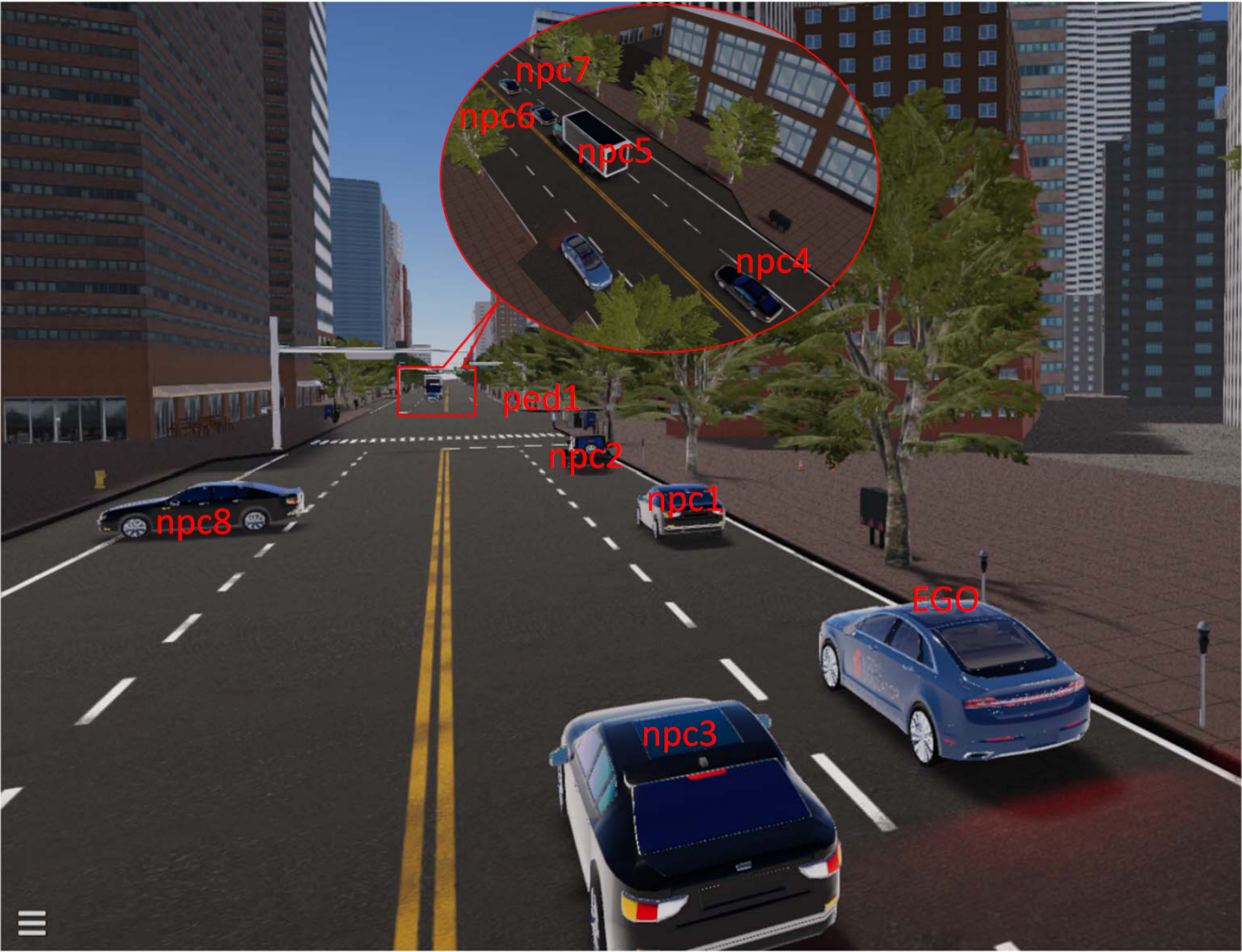
Ego vehicle: The task of the ego vehicle is to move from the start point(553090.05,4182687.8) to the target location, which is on Lane lane40 and 50 meters away from the lane’s start position.npc1:npc1is 30 meters ahead to the ego vehicle with the same direction of the ego vehicle. It needs to turn right and reach the position that is 100 meters away to the start point of the output lane. The initial speed is 6m/s, and the speeds on the junction lane and the output lane are 2m/s and 6m/s, respectively.npc2: The initial relative position ofnpc2with respect to the ego vehicle’s initial position is (−50,0) and the heading is same with the ego vehicle. The motion of npc2 is described by a set of waypoints with specified speed.npc3:npc3is described by an initial state, i.e., the initial position is 10 meters to the start poition of Lane lane38 and the initial speed is 5.6m/s, and the target position which is 100 meters to the start position of Lane lane41.npc4:npc4is located at the position that is 10 meters away to the start point of lane lane42 and the heading is opposite to the ego vehicle. It need to move in a constant speed 8m/s along any possible lanes.npc5: The initial position ofnpc5is 30 meters away to the start point of lane lane42 and is required to move in a constant speed 8m/s to the destination located at the point 50 meters away to the start of lane lane76.npc6: The initial position ofnpc6is 40 meters away to the start point of lane lane42 and is required to move to lane lane79. The initial speed is 7m/s. When it moves 1 meter on Lane lane761, the speed changes to 4m/s,then to 6m/s after moving 3 meters on Lane lane79. It stops after moving 50m on Lane lane79.npc7: The behavior ofnpc7is similar withnpc6, except that its initial position is 50 meters away to the start pointof Lane lane42 and is required to pass through Lanes lane762 and lane78.npc8:npc8is stopped on Lane lane36 and is 40 meters away to the start of lane36. The orientation is perpendicular to that of the ego vehicle.ped:pedmoves along the crosswalk with a constant speed 1m/s. The initial and target positions are (553006.37,4182693.24) and (553006.37,4182671.82). It needs to pass through the intermediate position (553003.37,4182681.82).weather: The time of the day is 12:00, and the weather is raining, fogging and wetness, whose degrees are 0.5, 0.1, and heavy, respectively.
Such a complicated scenario can be described by AVUnit as follows.
car_model = "Lincoln MKZ 2017";
ego_init_position = ENU (553090.0522572036,4182687.8);
ego_init_state = (ego_init_position);
ego_target_position = "lane_40"->50;
ego_target_state = (ego_target_position);
vehicle_type = (car_model);
ego_vehicle = AV(ego_init_state, ego_target_state,vehicle_type);

npc1_type = "Sedan";
npc1_heading = 0 deg related to ego_vehicle;
npc1_init_position = IMU (30, 0);
npc1_init_state = (npc1_init_position, npc1_heading,6.0);
npc1_state = (("lane_759"->1, ,2),("lane_77"->1, ,6));
npc1_destination = ("lane_77"->100);
npc1 = Vehicle(npc1_init_state, Waypoint(npc1_state), npc1_destination, (npc1_type));
...
ped_position = (553006.37, 4182693.24);
ped_init_state= (ped_position, , 1.0);
ped_state_list = (((553003.37, 4182681.82), , 1.0));
ped_destination_state = ((553006.37, 4182671.82))
ped_motion = Waypoint(ped_state_list);
ped = Pedestrian(ped_init_state, ped_motion,ped_destination_state);

time = 12:00;
weather = {rain:0.5, fog: 0.1, wetness: heavy};
evn = Environment(time, weather);

scenario0 = CreateScenario{     load(map_name);
                                ego_vehicle;
                                {npc1, npc2, npc3, npc4, npc5, npc6,npc7, npc8};
                                {ped};
                                {}; // no obstacles;
                                evn
};